
Do you need to know when your websites are offline?
If you run a website — or look after several — you already know the anxiety that comes with it.
- Is everything loading?
- Did something break overnight?
- Is the server having a moment?
Most people only find out something’s wrong when a customer mentions it, a colleague sends a message, or they happen to visit the site themselves at just the right (or wrong) moment.
Website Monitor puts you back in control. It’s a free, straightforward desktop app for Windows that watches your websites and tells you immediately when something isn’t right. No dashboards to log into, no monthly fees, no account to create.
Just add your sites and let it run on your Windows desktop or laptop, sitting quietly in your system tray — completely out of the way.

A colour-coding system in the system tray will alert you when one or more of your websites are offline.
Click to Download: Website Monitor
SMB Website Monitor Features
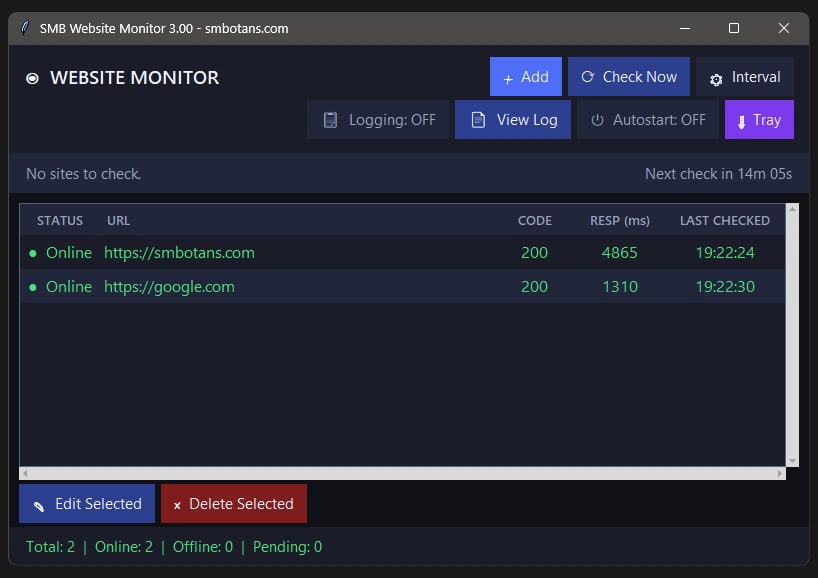
Watch as many sites as you need
Add any number of websites in one go — just paste them in, one per line. The app checks each one automatically and shows you the current status at a glance. Whether you manage two sites or twenty, everything is in one place.
Live status as each check happens
Results don’t wait until every site has been checked. Each site updates the moment its check is complete, so you can see results appearing in real time rather than staring at a loading screen.
Three clear status levels
Every site shows green for online, orange for a timeout, and red for offline — so you can read the full picture in seconds without interpreting any numbers or codes.
Smart timeout handling
If a site doesn’t respond in time, the app waits until all the other sites have been checked, then goes back and tries again with a more generous timeout. This cuts down on false alarms from slow-starting servers without slowing everything else down.
Accurate response times
See not just whether your site is up but also how fast it’s responding. Colour-coded response times make sluggish sites easy to spot before they become a real problem.
Automatic checks on your schedule
Set your preferred check interval — minimum 15 minutes — and forget about it. The app runs in the background and updates automatically. A live countdown shows you exactly when the next check is due.
We recommend setting the timer to between 15 min and 60 min.
System tray monitoring — always on, never in the way
Minimise the app and it keeps working silently. The tray icon turns red the moment any site goes offline — so you know without even opening the app. Orange means one or more sites are timing out. Green means all clear.
Starts automatically with Windows
Turn on Autostart, and SMB Website Monitor launches silently at login, going straight to the tray with no windows and no fuss. Perfect for always-on monitoring without ever having to think about it.
Downtime logging
Optionally keep a record of every outage — which site went down, when it happened, what caused it, and how long it was offline. Each entry is written to a plain text file the moment the site recovers, giving you a clear history you can refer back to or share with a hosting provider.
Edit and manage your site list any time
Add, edit, or remove sites whenever you like. Double-click any entry to update its URL, or select and delete sites you no longer need. All changes save instantly.
Remembers your setup
The app saves your window size, position, check interval, and log settings — so everything is exactly where you left it every time you open it.
Free, private, and completely self-contained
No account required. No data sent anywhere. No subscription. Everything runs locally on your own machine and always will.
What the buttons on the interface mean
Add: use this to add one or more websites to monitor. Use the full https:// prefix
Check Now: this will check whether all your sites are online or not, right away
Interval: use this set to set how often you want the app to check whether your sites are online or not. The minimum is 15 mn. Some servers may not be happy with 15 mn and may block the requests. You may want to use 60 mn.
Logging Off: this activates a logging into a text file as to which sites were offline, at what time, for how long, and why
View Log: this enables you to view the error log mentioned just above
Autostart OFF: this will enable the app to run automatically, minimized to the system tray, whenever Windows runs
Tray: click on this to minimize the app to the system tray
Other No-Frills Free Software
We have lots of other free no-frills software, click on the button on the right to view them all.
SMB Website Monitor Versions
- 3.00 Total rewrite and design of the app.
- 2.00 This release will check whether your site is online using a different method. And we have added 2 checkboxes: ‘Add to Startup’ and ‘Notify Offline’. Details above!
- 1.00 Initial Release