
Secure Your Data with Our Easy-to-Use
SMB Encrypt-Decrypt App
Protect Your Messages with AES Encryption
In today’s world, privacy matters more than ever. Our SMB Encrypt-Decrypt App makes it easy for anyone — not just tech experts — to encrypt text, secure notes, and protect personal messages in just a few clicks.
Why Use AES Encryption?
AES (Advanced Encryption Standard) is the same technology trusted by banks, governments, and security professionals worldwide. When you encrypt a message with this app, it is transformed into unreadable code that only someone with your secret keyword can unlock. This means your private words stay safe — whether you’re sending them online, saving them on your computer, or sharing them with a friend.
Easy to Use, Powerful Security
Just type your text, choose a keyword, and click on Encrypt. Share the encrypted text anywhere — by email, chat, or social media. The recipient simply enters the same keyword to decrypt and read your message. It’s fast, simple, and backed by strong AES encryption.
Take control of your privacy today.
Start using our SMB Encrypt-Decrypt App to encrypt text, protect your personal information, and enjoy peace of mind online.
Everyday Uses for Everyday People
- Send private messages that nobody else can read.
- Keep personal notes safe, like passwords, ideas, or diaries.
- Protect work or study files before sharing them.
- Create fun secret messages for birthdays, games, or special occasions.
SMB Encrypt-Decrypt Features
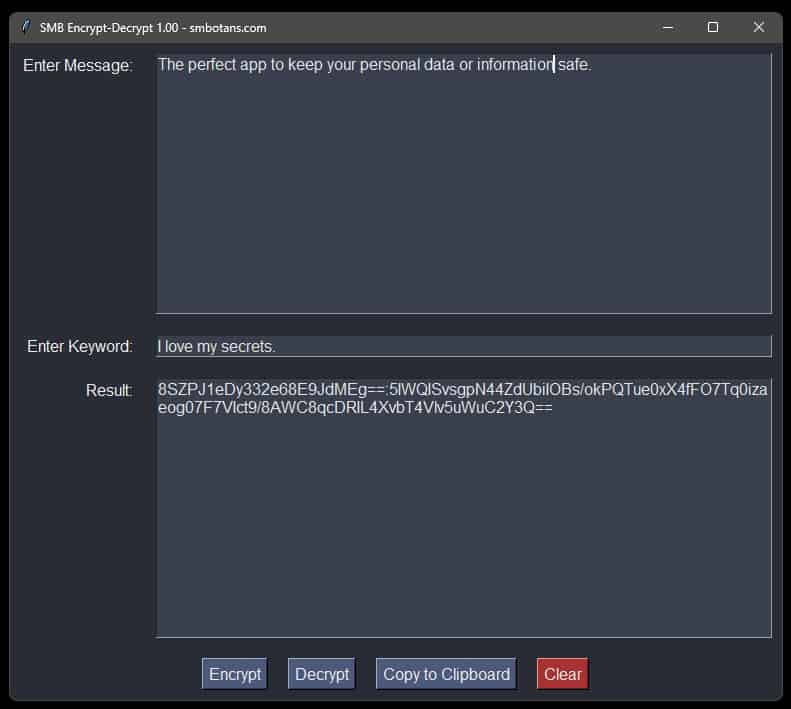
- Strong AES Encryption
Your text is protected with AES, the same encryption standard trusted by banks, governments, and security experts worldwide. - Encrypt & Decrypt Messages Easily
Type your message, set a keyword, and click Encrypt. You can then share it anywhere — the recipient will just need to enter the same keyword into our free app to decrypt it and read it. - Secure Personal Notes
You can use our app to keep your diary entries, your passwords, your ideas, or any text private and safe from prying eyes. - Share Secret Messages
You can use it also to send hidden messages to friends, family, or colleagues. Perfect for surprises, games, or private conversations.
- Fast & Simple Interface
No technical skills are needed. Just a clean, easy-to-use app that works in seconds. - Keyword Length
Your keyword can be as long as you like. But, a longer keyword is much much better. See below! - Copy & Paste Convenience
Encrypted text can be copied into emails, chats, or social media — only the person with the keyword and our free app will be able to read it. - Customizable Look
The interface features a dark, modern design with clear text, making it comfortable for everyday use. - Remembers Your Window Setup
The app saves its size and position so it always opens the way you like it.
Other No-Frills Free Software
We have lots of other free no-frills software, click on the button on the right to view them all.
Why a Longer Keyword is Better
The security of your encrypted message doesn’t just rely on the AES algorithm; it heavily relies on the secrecy and strength of your keyword. Attackers often try to guess keywords using methods like:
- Dictionary Attacks: Automatically trying every word in a dictionary.
- Brute-Force Attacks: Systematically trying every possible combination of characters.
A short and simple keyword like "key" or "test1" can be guessed by a computer in a fraction of a second. A long, complex keyword makes these attacks practically impossible.
The key concept here is entropy, which is a measure of randomness and unpredictability.
- Low Entropy (Weak): Short, common words like
"password"or"secret123". They are predictable and easy to guess. - High Entropy (Strong): Long, random-looking strings of characters like
"R7#k&z@9pQ!v*sL2". They are unpredictable and incredibly hard to guess.
Therefore, if an attacker can guess your keyword (e.g., "dog"), then they can decrypt your message.
What Makes a Good Keyword?
You need to think of a password as a passphrase rather than a single password.
Aim for these characteristics:
- Length: The longer, the better. 16+ characters is a great starting point.
- Complexity: Use a mix of uppercase letters, lowercase letters, numbers, and symbols (
!@#$%^&*). - Unpredictability: Avoid common phrases, names, or easily guessable patterns.
A good strategy is to combine several unrelated words with symbols and numbers.
- Weak Example:
Mysecret(Short, common word) - Strong Example:
Correct!Horse_Battery-Staple77(Long, complex, and memorable)
SMB Encrypt-Decrypt Versions
1.00 Initial release.